Which tenders does TenderTools work well for?
TenderTools works on the documents you create: a plan or a proposal. The text you write is what gets scored. The label on the file changes. The work does not.
Tenders
Public and private contracts, from a single call to a full programme. Upload the pack and the workspace works from this tender's own criteria, weightings, page limits and timetable.
RFPs
Requests for proposal are won by comparison: your proposal is read next to the others. TenderTools shows what the buyer really asks and keeps every answer scoring.
Bids
Wherever a contract is decided by a written offer, the method fits: read the documents, take a position, write criterion by criterion, review before you submit.
Proposals
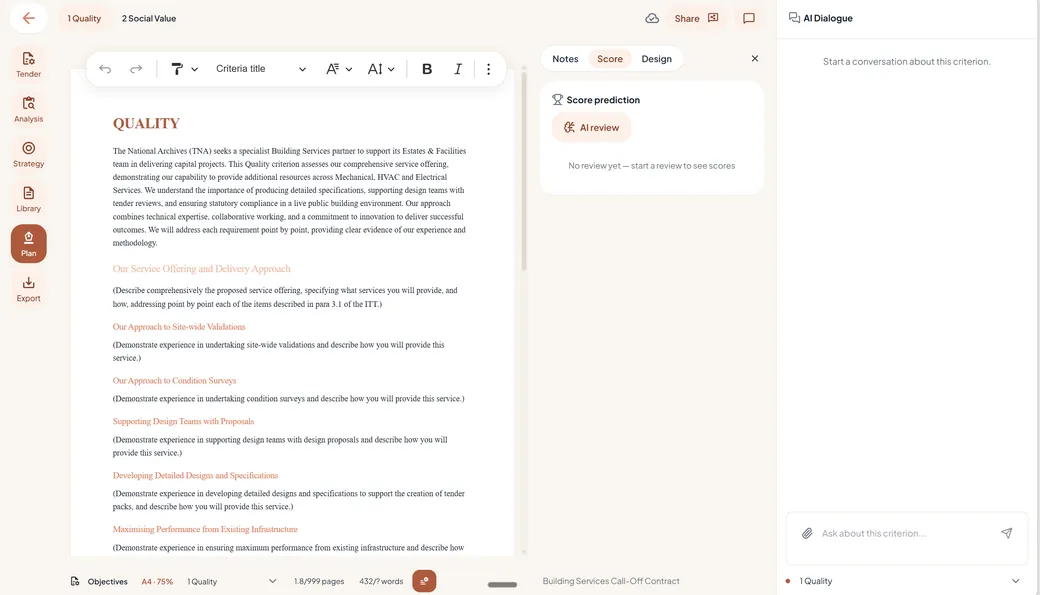
The proposal is what gets scored. TenderTools is built around it: a Word-like editor on A4 with a live page counter, expert buttons and your own library as evidence.
From a quick plan to the ultimate one.
You can use TenderTools in many ways: fast where quality is weighted lightly, thorough where quality decides the winner.
Small tender, quick plan
Where quality is weighted lightly, speed is what counts. Reuse documents from your library, run a small gap analysis, and create a solid plan quickly.
Quality-heavy tenders
Where the quality of the proposal is weighted at more than 80% — even 100% — TenderTools helps you get to the ultimate plan.
Big team, many sources
It processes a lot of information and context from a lot of sources — a large team of specialists, all feeding one plan.
Overview and the nitty-gritty
Shortcuts for shortening, combining or splitting text, and win themes that link the analysis with the strategy and the measures in the plan — so you can go the last mile on quality.
Any length, to the buyer's rules.
When a client asks for a plan or a proposal, what you deliver is a document to the contracting authority. It may carry a page limit or no limit at all. TenderTools handles both. The limits that do apply are read from the tender documents and tracked while you write, so you always know where the document stands.
The same goes for the format rules: paper size, font size, margins and the rest. They are taken into account from the start and checked continuously, so a requirement you would otherwise miss shows up while you can still fix it.
- Page and word limits, or none at all
- Paper size, font size and margins, as prescribed
- Continuous checks while you write
Tender writing is not marketing writing.
Tender writing is different from any other writing. Marketing copy and brochures sell, a report informs. A tender response has to do something harder: answer the buyer's questions, prove its promises and survive scoring against the criteria. Every paragraph either earns marks or spends space.
TenderTools is built around that difference. It knows how a plan text is structured, what wording improves the score, and how the analysis, the strategy and the writing connect. That knowledge of what is typical for tender writing is incorporated in the software itself, from the expert buttons to the review.
What does a tender actually reward?
Every tender comes with its own criteria, weightings and scale. TenderTools works from that, never from a generic checklist.
Take a position
Win themes and positioning for this tender: what distinguishes you from the competition, based on your own strengths or the client's question. The strategy steers every sentence that follows.
Answer the client's question
The summary, the client's objectives and the award criteria with weightings and scoring scale come out of the documents first. That is the ground your response stands on.
Know it will score
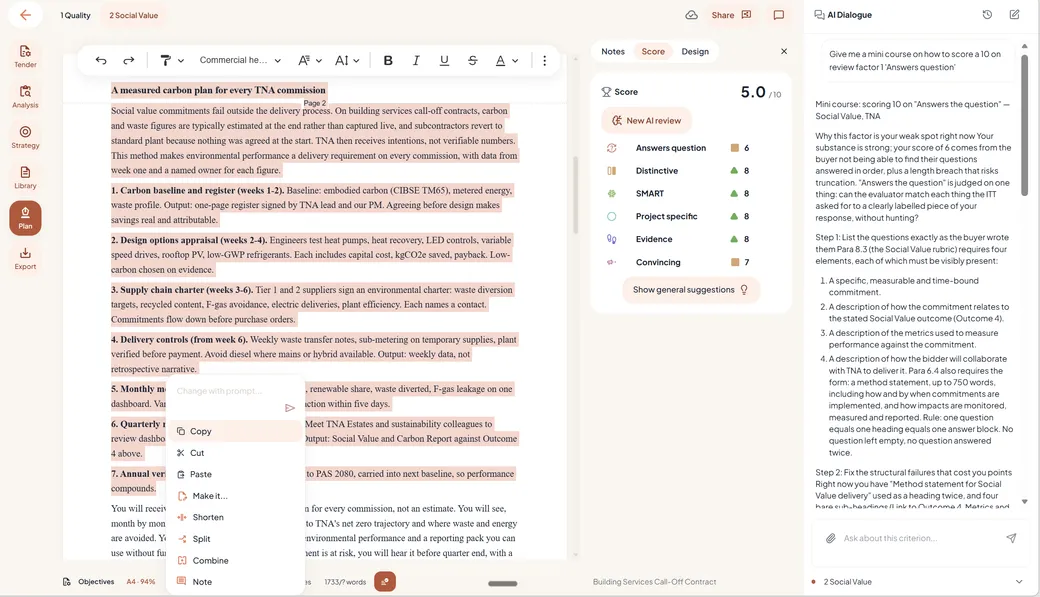
Every criterion is reviewed on requirements, writing, strategy and structure, and given an expected score on the same scale the evaluator will use.
Set the winning strategy before you write a word.
The analyses feed the strategy: your positioning for this tender, win themes per section and a tone of voice that suits the person reading it. Set it from your own strengths, from the client's question or from the competitor analysis, or let the AI propose the strongest angle, and filter it on one question: will this score with this client, in this contract, with this evaluator?
- Positioning for this tender
- Win themes per section
- A tone of voice that suits the reader
- An idea filter that separates what is distinctive from what is standard
Six questions decide your score.
The review scores each criterion on the six-factor model, grounded in how evaluators scored in more than 1,500 tenders. The questions are simple. The work is in answering them.
Answer the client's question
Does this show we understood what is asked, and what the client actually wants?
Project-specific
Is this about this project, or a text we could send to anyone?
SMART
Can the client test these promises and hold us to them?
Distinctive
Why us, and not another bidder?
Substantiated
Why should the client believe this?
Persuasive
Will this response stay with the evaluator?
Questions, answered.
Which documents does TenderTools work well for?
Tenders, RFPs, RFQs, RFIs, bids and proposal writing: any process where the document you write gets scored. What the file is called does not change how the workspace works. Upload the documents and TenderTools reads the criteria, weightings, limits and deadlines from what is in them.
Do RFPs, RFQs and RFIs need a different approach?
The method is the same: analysis, strategy, writing per criterion, review. The emphasis shifts with the document. An RFP is read next to competing proposals; an RFQ is short and weighed sharply inside tight limits; an RFI shapes the conversation before the tender itself. TenderTools reads each pack on its own terms.
Does it work for public and private tenders?
Yes. Public procurement with formal award criteria and private buyers comparing proposals both end in a written response that gets scored. TenderTools works from the criteria, weightings and scale in your documents, no matter who issued them.
Does it only work for large tenders?
No. A short RFQ and a multi-annex tender dossier get the same workspace: the documents are read, the strategy is set, and the responses are reviewed. You decide how much of it to use on each one.
Can it use our existing content and house style?
Yes. Earlier responses, case studies and company information sit in a content library, next to the question they belong to. Brand style and tone of voice are part of the setup, so the writing starts from your voice, not a generic one.
Does it work with how tenders are scored where I am?
The review follows the scale and weighting in your own documents, wherever the tender comes from. UK award methodology (MEAT, MAT under the Procurement Act 2023) and Dutch award methodology are built in.
What languages does it write and review in?
English and Dutch. The analysis, the editor and the review all work in both.
Do I have to follow every suggestion?
No. No tool is compulsory and every suggestion can be declined. Nothing in your response changes without you seeing it, and you can check the expected score at any moment.
Can colleagues and external reviewers be involved?
Yes, reviewers are always free. Colleagues and external reviewers can be invited to any tender at no cost and never use a seat. You only pay for the people who write.
Where does my tender material live?
In EU data centers, encrypted with AES-256 and GDPR compliant. More about how we handle data →
How long does it take to see whether it fits our tenders?
Half an hour with one real tender. Upload something you already have running, or one you have just submitted. Let TenderTools analyse the documents and set the strategy, then brainstorm your plan or have your existing plan reviewed. You will know how well it works for you.
Is there a free trial?
Yes, free for 30 days, no credit card required. The trial runs on Professional and starts at your first login. Try it on your current tender.
Try it on your current tender.
Try to run it. See how it helps you. See how it does things for you. See how it gives you useful feedback within a few clicks.